Manage employees, attendance, and pay
Prepare staff records, review a pay run, and record payments and advances.
Open in MilkSageSet up employees and attendance
- Open Payroll → Setup to maintain departments and designations.
- Use Employees → Add employee for staff code, name, joining date, department, designation, salary, and applicable contact or payment details.
- Open Attendance and choose the date. Record Present, Absent, Leave, or Half day and any requested working, late, or overtime minutes.
- Review missing attendance and any import results before preparing pay.
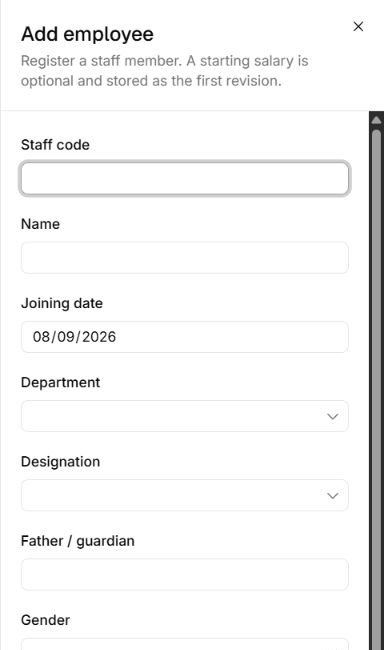
Create the staff record first
Payroll → Add employee · Upper fields
- Start with Staff code, Name, and Joining date.
- Department and Designation use the values maintained in Payroll → Setup.
- Scroll further in the form for contact, salary, and payment information. This screenshot shows the upper fields only.
Create and post a pay run
- Open Pay runs → New pay run and choose the period start and end dates.
- Open the draft and review each employee’s amounts and deductions.
- Use Post pay run, choose the posting date and accounting period, and select Wages expense, Wages payable, and other accounts requested for deductions or advances.
- Review the posted run. Record payment for the employee using the amount, payment date, period, wages payable, and cash account.
Advances and corrections
Use Advances to give an advance, record a repayment, or allocate an available advance where supported. Review balances before paying or deducting again. Posted runs, payments, advances, and repayments have dedicated reversal workflows when eligible.
Employee records versus access
A payroll employee record stores employment and pay information. Workspace access is managed separately through Settings → Team; adding an employee does not replace inviting a farm member.
Related guides
Set up accounts and record transactions
Prepare the chart and periods, then follow entries through the ledger and statements.
View and download reports
Choose a report, set its parameters, and download a snapshot of farm records.
Invite your team and manage access
Add members and control the actions each role can perform.