Animals & care
Record health events and follow-ups
Track individual or group care, review attention lists, and close follow-ups.
Open in MilkSageRecord care
- Open Health and start a health event, or choose Add record → Health event from an animal.
- Select the animal first to reveal the event fields. Choose Date and Record type; the app includes treatment, checkup, vaccination, deworming, and other care or measurement events.
- Complete the event-specific details. For a checkup, use Technician or veterinarian, Diagnosis or reason, Findings, and Prognosis. Scroll for further details; medicine fields depend on the event type.
- Save, then check the Events list and the animal’s Health records.
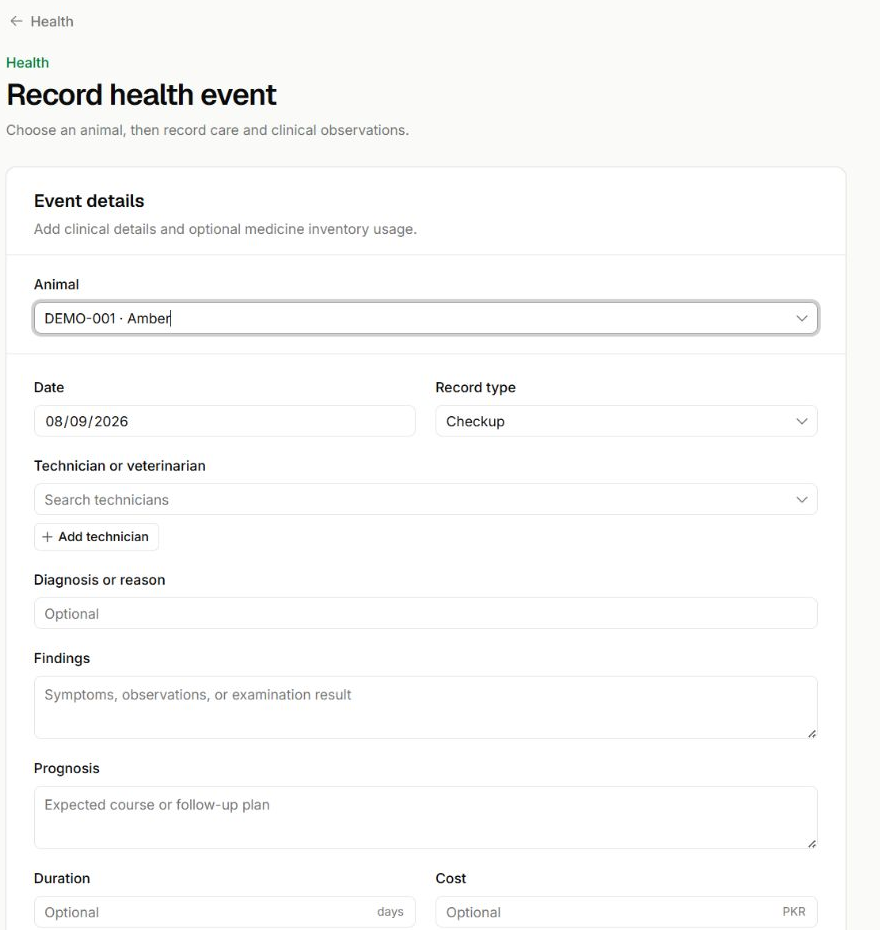
Select the animal before entering care
Record health event · Unsaved checkup form
- The Animal selector determines which record receives this event. Amber is selected here only to show the form.
- Check Date and Record type. The fields below change according to the kind of care recorded.
- Technician, diagnosis, findings, and prognosis keep the observations with the event. Continue down the form for remaining details and saving.
Record a group event
Use the group health entry page to choose a herd or pen and enter the event details. Check the target and date carefully before submitting a record that applies to the group.
Manage follow-ups
- Use Attention for animals needing review and Schedules for planned care.
- Open the relevant record to record an outcome or resolve an event.
- Use the schedule’s available completion, snooze, or cancellation action when the care plan changes.
- Review follow-up dates and notes after saving. A correction or reversal of a source record may also change its associated reminders.
Related guides
Register and manage animals
Build an animal’s identity, placement, and lifetime record.
Manage inventory and stock
Create items, receive lots, record consumption, and investigate stock alerts.
Read history and correct mistakes
Find the original event and use the correction or reversal intended for that record.