Work & finances
Set up accounts and record transactions
Prepare the chart and periods, then follow entries through the ledger and statements.
Open in MilkSagePrepare the chart and period
- Open Accounts → Chart and use Add account for the accounts your farm needs.
- Enter its code, name, and appropriate type and role. Roles include Cash, Revenue, Receivable, Inventory, Payable, Expense, and Equity.
- Open Periods and use Add period to define its name, start, and end dates.
- Use the required accounts and an eligible open period when posting farm operations.
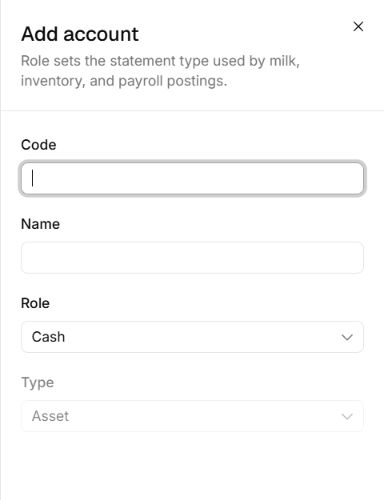
Choose an account’s role
Accounts → Add account · Entry fields
- Code and Name identify the account in lists and posting forms.
- Role sets the statement type used by related operations. Cash is shown here, with Asset as its type.
Record a transaction or journal
- Use Transactions → Record transaction for an income, expense, transfer, or other operational transaction.
- Enter the date, amount, description, and requested accounts and period.
- Use Journal → Post journal when a manual journal is needed. Complete its debit and credit lines and review the totals before posting.
- Check the resulting Journal and Ledger entries. Records from milk sales, purchases, and payroll can also appear here.
Read statements and correct entries
Statements includes Trial balance, Profit and loss, Balance sheet, Cash flow, and Receivables aging. Set the relevant dates and filters. Use the source operation’s reversal workflow for an incorrect posted record, and review the linked accounting effect.