Milk & production
Record and correct daily milk
Enter morning, noon, and evening litres for each animal and review production history.
Open in MilkSageRecord a milking
- Open Milk records → Daily capture and select the operational date.
- Find the animal by tag or name. Check that you are entering litres for the correct animal and session.
- Enter the morning, noon, and evening quantities you have measured.
- Use Save for the animal’s row or card. Wait for saving to finish and check any field or save errors.
- Open History to review recorded yields. An animal’s own Milk records section also shows its production history.
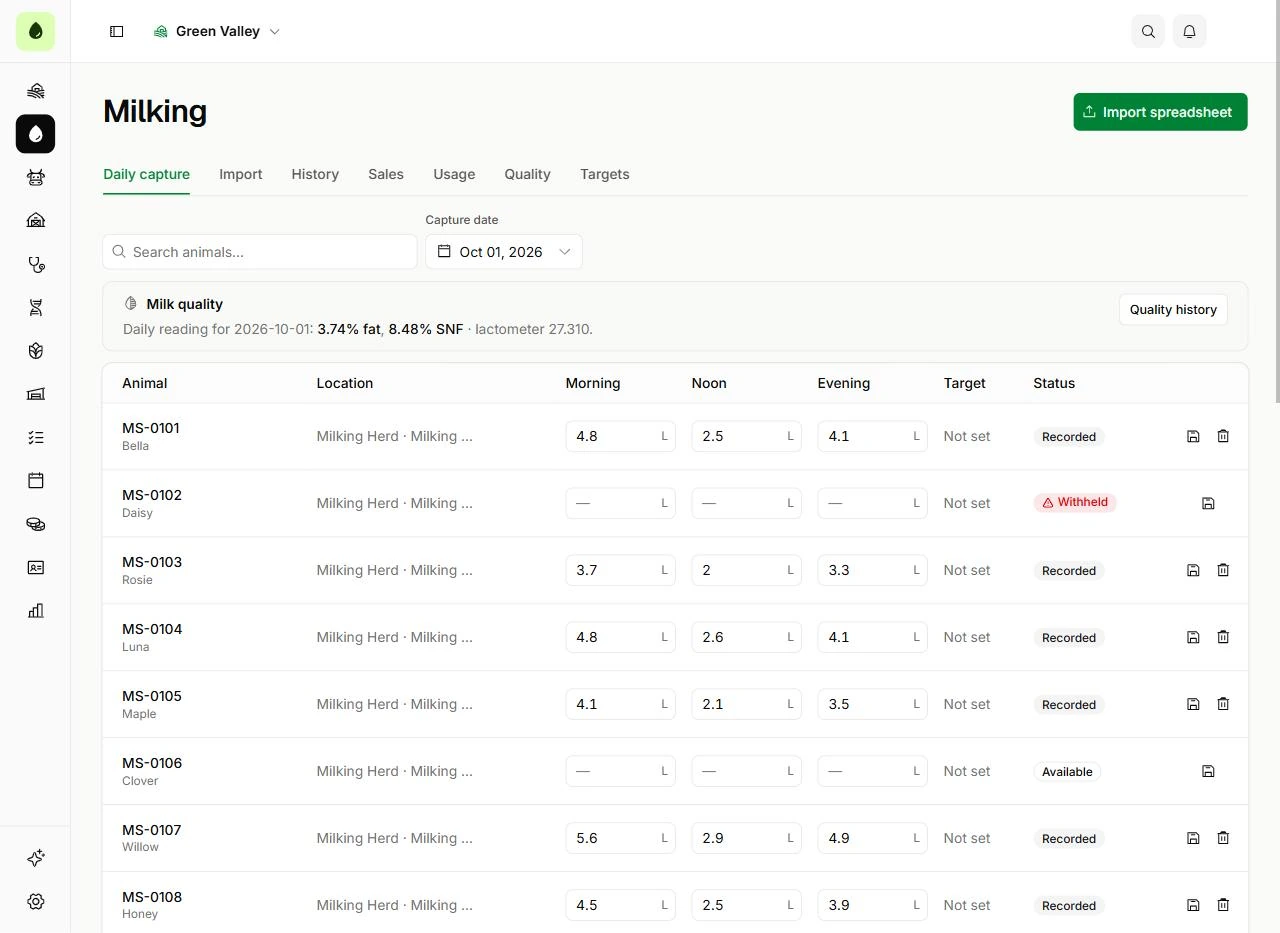
Where to enter each session
Milk records → Daily capture
- Check Capture date above the table before entering litres.
- Each animal has separate Morning, Noon, and Evening fields. The row’s save icon saves that animal’s entries.
Correct a record
Use the animal’s milk history correction action to amend an existing yield. Review the original session, date, and quantity before confirming. Daily capture also offers Clear day for eligible records; its confirmation removes that animal’s recorded sessions for the selected day.
Before you continue
Clear day affects the whole selected day for that animal. Use a targeted correction when only one session is wrong.
If an animal is missing
Check its lifecycle status and sex. Milk capture is for active female animals. Confirm its registration and use the correct farm and search filters.